

ATTENDANCE MANAGEMENT
No Sign-In Sheets. No Chasing Credits.
Attendance is collected, recorded, and reported digitally. Everyone marked Attended is reported by the end of the next business day, and everyone involved sees the status in real time.
Not on the platform yet? See CEU Events for Providers or CEU Events for Places.
THE CHALLENGE
Attendance Is Where Compliance Breaks Down
AIA, AIBC, IDCEC, LA CES, and other governing bodies require attendance to be reported within a set number of days. That task usually falls on the program lead or the instructor, often days after the event is over.
Paper Sign-In Sheets
Many programs still pass a clipboard around the room. Someone then has to read the handwriting and type every name and number. A scanned copy is the best case.
Missing Required Information
Each credit needs specific details, such as a member number or license number. A sign-in sheet rarely captures all of them, so some credits cannot be reported.
Private Information in Open View
Names, emails, and license numbers sit on a sheet that every attendee can see. The sheet is then carried, scanned, emailed, and stored.
No Consent to Follow Up
A signature on a sheet is not permission to contact someone. Without consent, there is no clear way to follow up after the session.
Back and Forth
Unreadable entries mean emails and calls to track people down. Meanwhile, the reporting window keeps closing.
Urgent Requests Later
Attendees come back months later when they need their credits or face an audit. Finding the record becomes an urgent matter.
THE SOLUTION
Collected, Recorded, and Reported Digitally
Compliance starts with the governing body. For every governing body on our platform, we set up a detailed account with its standards and requirements. Every course approval and recognition links back to that account, so attendance is captured the way each credit requires.
Capture the Right Information
Attendees register digitally and provide the details each credit requires, typed by them instead of read from handwriting.
Record Attendance
The attendance list is digital. The instructor marks attendees as Attended, or attendees record their own attendance.
Report by the Next Business Day
Everyone marked attended is reported by the end of the next business day.
See the Status in Real Time
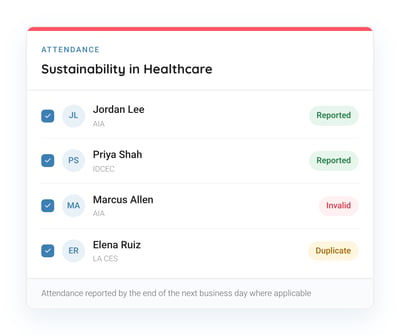
Each attendee shows Reported, Invalid, or Duplicate. Issues surface right away, not months later.
IN PERSON AND VIRTUAL
Three Ways to Collect Attendance
Preregistration link
The instructor shares the event link before the session. Attendees register with their own account and provide the information their credits require, so nothing is entered by hand.
Bonus: When attendees share meal preferences or allergies, you see them on the list. Useful for in-person lunch and learns.
Attendance Recording Guide
A printable one-page guide with the event details and instructions on how to register for credit during and after the event. Attendees follow it on their own devices and record their own attendance.
Paperless Attendance Slide
We include this slide at the end of each presentation. It is built for events without preregistration, conferences, and hybrid events where many people are watching. Attendees register and record their own attendance from their devices.
Recording Attendance
The instructor checks the Attended box for each attendee on the digital attendance list.
Attendees who register through the Attendance Recording Guide or the Paperless Attendance Slide record their own attendance.
Either way, everyone marked Attended is reported by the end of the next business day.
REPORTING STATUS
Three Statuses. No Guessing.
The attendance was submitted to the governing body. Nothing else is needed.
The governing body could not match the record, often because of an incorrect member or license number. It is visible right away so it can be corrected.
The attendee already has credit recorded for this course, so it cannot be reported twice.
We Support Your Attendees
When a record shows Invalid or Duplicate, or an attendee has any other question about their credit, our team works with them directly, so you do not have to.
SIDE BY SIDE
How Attendance Reporting Compares
Some third-party platforms offer to forward attendance reporting for the Provider. These are often media companies or businesses that market other events and courses. Attendees may not expect their information to go there, and the transcript may show the third party's name instead of yours.
| Task | Paper Sign-In | Third-Party Forwarding | CEU Events |
| Collecting details | Handwritten, often incomplete | Collected by the instructor, forwarded to the third party | Entered by the attendee at registration or by the instructor |
| Private information | Visible to everyone in the room | Shared with a company that may market other events and courses | Kept under the event details |
| Attendee contact | No consent to follow up | Attendees may receive promotions they did not expect | We do not send your attendees marketing emails. Attendees who register agree to our Terms of Use, which state that the Provider or instructor may contact them. |
| Name on the transcript | Your company name | May show the third party instead of your company name | Your company name |
| Reporting | Manual, typed in by the program lead or instructor | By the third party, on its own timing | Attendance reported by the end of the next business day where applicable |
| Errors | Found when an attendee asks for credit or during manual reporting | Visibility depends on the third party | Flagged as Invalid or Duplicate in real time |
| Audits and requests | Search through files and scans | Records held by the third party | One digital record for every session |
THE DIFFERENCE
Built for Everyone in Continuing Education
01
Compliance Starts at the Source
Each governing body account holds its standards and requirements. Approvals link to it, and attendance follows it.
02
One Record, Shared in Real Time
Our staff, the Provider, the instructor, the location manager, and the attendee all see the same reporting status.
03
Reporting Off Your Plate
Instructors and attendees record attendance. The platform handles the reporting to more than 100 associations and state licensing boards, where applicable.
04
Ready When Someone Asks
When an attendee needs proof of credit or a governing body requests records, the history is already in place.
TRANSPARENCY
Everyone Sees the Same Status
We built an ecosystem for everyone involved in continuing education, with tools for efficiency and compliance. Attendance status is visible to each role.
HOW IT WORKS
From Registration to Reported
Governing body set up
We set up a detailed account for the governing body with its standards and requirements.
Course linked to its Approvals
Each course Approval and recognition links to the governing body account.
Attendees register
Attendees register through the preregistration link, the Attendance Recording Guide, or the Paperless Attendance Slide.
Attendance marked
The instructor checks the Attended box, or attendees record their own attendance through the guide or the slide.
Reported and visible
Attendance is reported by the end of the next business day, and the status appears for everyone involved.
We live by our tagline:
Educate More. Manage Less.
We report to more than 100 associations and state licensing boards, including AIA, AIBC, IDCEC, and LA CES, where applicable
Everyone marked as 'Attended' is reported by the end of the next business day.
Our staff, the Provider, the instructor, the location manager, and the attendee all see the status in real time.
The status appears right away, so the attendee can correct the information, with our team’s help if needed, and the attendance can be reported.
The Paperless Attendance Slide at the end of each presentation lets attendees in the room or watching online register and record their attendance from their own devices.
No. The attendance list, recording, and reporting are all digital. The Attendance Recording Guide can be printed, but it holds instructions, not attendee information.